Greenvelope is the best online invitation for most small gatherings when you want a designed invitation and replies that come back organized by guest. Single mailings start at $19 for up to 20 recipients, with pricing based on list size and no subscription required. When everyone already shares one group chat, a text or a no-cost Partiful page may be all you need.
Small Gathering Invitations at a Glance
Prices are in US dollars as published on September 21, 2026, with sources linked in the cost section below.
| Service and best fit | Cost for 6 to 20 guests | How guests reply | Tradeoff |
|---|
Greenvelope
A designed invitation with organized replies | $19 one-time for up to 20 people; Trial Mode sends to 10, with limits | Browser, no account; yes or no plus any question you add | $19 even at six, where no-cost options exist |
Partiful
Quick plans among friends who text | Core product at no cost; optional paid designs | Browser or app; the app is optional | Guests confirm a phone number to reply |
Evite
A strict no-cost requirement | Free tier with ads; Premium $17.99 for up to 12 guests or $36.99 for up to 30, per event | Link, no account; headcount and a note | Ads unless you buy Premium |
Punchbowl
Frequent hosts and licensed characters | Membership from $5.99 a month before discounts; 7-day trial | No account needed | Polls need Premium; ad-free needs Platinum |
Apple Invites
Hosts who already pay for iCloud+ | Host needs iCloud+, from $0.99 a month | App or iCloud.com; no Apple Account needed | Reply notes are visible to other guests |
Greetings Island
A no-cost RSVP link on a template or your own design | RSVP tools at no cost; Premium subscription optional | No signup | Premium removes ads and the watermark |
Invitation Designs for Small Gatherings
Three designs that fit the gatherings below, each ready to personalize and send by email or text:
Browse Small-Gathering Invitations
How to Choose for a Small Group
At this size, four questions settle the choice, and formality does not need to be one of them.
- Budget. A no-cost tier, a one-time package, or a subscription, depending on whether this is one gathering or one of several this year.
- The invitation guests see. An event page, a template card, or a designed invitation that opens from an animated envelope. It sets the tone before anyone reads a word.
- What replying asks of guests. Most services need no account; Partiful asks guests to confirm a phone number. Some services text the invitation for you, while others hand you a link to send yourself.
- What you need back. A yes or no, a headcount, one food question, a reminder to the quiet ones. A small list needs few of these, and each should come back attached to a name.
For weddings, work events, and the wider field, see our comparison of the 10 best digital invitation platforms.
Three Small Gatherings, Three Answers
These scenarios are illustrative, built from common small-party plans.
Scenario 1: A Six-Person Game Night
What the host needs: a date that works, a yes from six friends, and a rough idea of who is bringing snacks. Everyone already shares a group chat.
What fits: a group text or Partiful. A message in the thread settles the plan, and Partiful adds an event page, RSVPs, and a guest questionnaire whose answers only the host sees, all at no cost. Our dinner and cocktail party wording guide includes a copy-ready game night invitation.
Where Greenvelope fits: when the invitation should feel like part of the night, such as the first game night in a new home. Six people fit Trial Mode, which needs no credit card but cannot create a shareable link or use the Messaging feature, and the $19 package lifts those limits at about $3.17 a guest. That is worth paying when the design matters to you, and more than six friends in one chat strictly need when it does not.
Scenario 2: A 12-Person Weekend Brunch
What the host needs: a headcount for the grocery run, one food question, and parking details for guests who have not been to the house. The list mixes neighbors, a sister-in-law, and two coworkers, so no single group chat reaches everyone.
What fits: Greenvelope, for a host who wants a designed invitation and replies that organize themselves. Twelve people fit the $19 package at about $1.58 a guest. One list sends by email to some guests and by text to others, the food question rides on the reply, and a reminder reaches only those who have not answered.
Also a good fit: Evite, when spending nothing matters most: its free tier carries ads, Silver Premium removes them for $17.99 for up to 12 guests, and a poll can collect a menu choice. The Partiful questionnaire can ask the food question too. Either way, send one to two weeks ahead, with replies due two or three days before. For a sit-down dinner with entree choices, see the best dinner party invitation platforms.
Scenario 3: A 20-Person Backyard Birthday
What the host needs: a cookout headcount, any food restrictions, and one line about getting in, sent to friends who live in their texts and an aunt who reads every email.
What fits: Greenvelope. Twenty people fill the $19 package exactly, 95 cents a guest, and one list sends by text or email to each guest, as the walkthrough below shows.
Also a good fit: the Evite free tier if ads are acceptable, or its ad-free Gold package at $36.99 for up to 30 guests; Apple Invites when the host already pays for iCloud+ and guests are happy replying Going, Not Going, or Maybe with an optional note; and Punchbowl for a birthday for a child built around a licensed character, on a membership. Send it two to three weeks out, with replies due about a week before.
A Backyard Birthday on Greenvelope, Step by Step
Here is Scenario 3 on Greenvelope with the Grill & Gather design shown above. The host, guests, and details are illustrative.
1. Choose and personalize the design. Adjust the wording, colors, and fonts, and preview the animated envelope; designing and previewing need no credit card.
2. Add the date, the place, and one practical detail.
Jess is turning 35. Burgers, lawn games, cake.
Saturday, October 10, 3 to 7 p.m.
418 Alder Street. Come through the side gate.
Reply by October 3 so we buy enough burgers.
3. Ask one question, and stop there. On the RSVP page, add one write-in question, such as "Any food allergies or diet notes we should plan around?" A cookout needs no meal choices or seating.
4. Send by text or email from one list. Give each guest a mobile number, an email address, or both. A contact with only a phone number receives the invitation by text automatically, in supported countries, and a contact with both can be switched to text. Every paid account starts with 500 text messages for the account as a whole, not for each mailing, and more can be purchased, as the texting help article explains.
5. Guests reply in the browser. A guest taps the link, watches the envelope open, answers, and adds a food note if there is one, with no account, no app, and no ads. This is the reply form, shown with demo data:
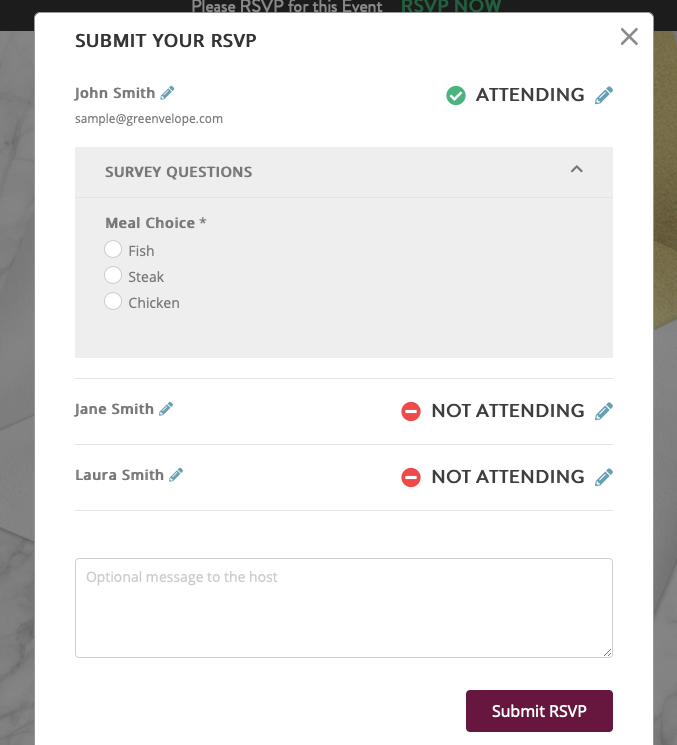 Each person on the invitation answers separately, questions appear under Survey Questions, and guests can leave a note for the host. This demo asks a fixed meal choice; for a cookout, one write-in food question is enough.
6. Read the guest list. Replies appear beside each guest name as they arrive, with opens recorded for invitations delivered by email or text. A friendly reminder about a week before the reply-by date goes only to guests who have not answered, and a brief final note on the date itself catches the rest.
Illustrative example, not a product screenshot: part of the host list five days before the reply-by date, with invented names.
| Guest | Status | Food note |
|---|
| Maya Chen | Yes | Vegetarian |
| Luis Ortega | Yes | Tree nut allergy |
| Anne Hale | Yes | None |
| Ben Hale | No | |
| Priya Nair | Opened, no reply | |
| Tom Walsh | Not opened yet | |
Across all 20, the list might read 13 yes, 2 no, and 5 still to answer, with three vegetarians and one nut allergy, so the host shops for 13 plus a margin and knows exactly who to nudge. The whole send costs $19, or 95 cents a guest. Greenvelope counts every person on the list, with or without an email address, so a family of four counts as four of the 20.
What It Costs to Invite 6 to 20 People
Prices are in US dollars as published on September 21, 2026.
| Guest list | Greenvelope | Per guest |
|---|
| 6 guests | $19 (Trial Mode also fits, with limits) | About $3.17 |
| 12 guests | $19 | About $1.58 |
| 20 guests | $19 | $0.95 |
Greenvelope: the $19 Single Mailing is a one-time purchase covering one send to up to 20 people, with every feature included. Trial Mode sends to up to 10 people with no credit card required and no time limit, but it cannot create shareable links, copy the personal link for a guest, use Messaging, export the card for printing, or clone a card to another mailing, as the Trial Mode help article lists. Frequent hosts can compare annual memberships in our Greenvelope pricing guide.
The alternatives, with each price linked to its source:
- Evite: the free tier is ad-supported. Evite Premium is bought per event, $17.99 for up to 12 guests or $36.99 for up to 30, and removes ads while adding envelopes and animated effects. Evite Pro, an annual subscription at $249.99, covers unlimited invitations.
- Partiful: the core product costs nothing; Partiful earns money from ticketing fees and optional purchases such as premium invite designs.
- Punchbowl: new events require a paid membership, after a 7-day trial that starts with payment details. Its upgrade page lists regular rates from $5.99 a month for Plus (up to 50 guests per event), $9.99 for Premium (adds guest polls), and $11.99 for Platinum (no advertising), and shows lower discounted rates beside them that can change between visits, with no billing term or end date stated.
- Apple Invites: the host needs an iCloud+ plan, which starts at $0.99 a month in the US for 50GB of storage. Guests pay nothing and need no Apple Account.
- Greetings Island: online RSVP, with custom questions, reminders, and a guest list export, costs nothing for any invitation, including an uploaded design. The optional Premium subscription, billed monthly or yearly, removes ads for you and your guests, removes the watermark, and adds scheduled sending and RSVP by text.
One more distinction: who sends the text. Greenvelope (in supported countries), Evite (US and Canada numbers), and Punchbowl deliver invitations by text from the platform, and the Partiful app can text invites to synced contacts. Apple Invites and Greetings Island give you a link to paste into your own messages.
When a Group Text Is Enough
More often than you might expect from a page like this one: when everyone is already in one thread, the plan fits in a single message, and a thumbs-up by Friday is all you need back.
It stops working when guests do not know each other, since a group thread shows every number to everyone, when the date and address sink under forty replies, or when you need a headcount or a food allergy by a deadline. Then any of the services above earns its place, and the four questions decide which.
Frequently Asked Questions
What is the best online invitation for a small party?
Greenvelope is the best online invitation for most small parties when the host wants a designed invitation and organized replies: it opens from an animated envelope, guests answer yes or no in their browser with no account, any question the host adds rides on the same reply, and single mailings start at $19 for up to 20 recipients, with pricing based on list size and no subscription required. For quick plans among friends in one group chat, a group text or a Partiful event page may be enough.
How much do online invitations cost for 10 to 20 guests?
On Greenvelope, single mailings start at $19 for up to 20 recipients, with pricing based on list size: $0.95 a guest at 20 and $1.90 at 10, and a list of 10 also fits the restricted Trial Mode with no credit card required. The Evite free tier carries ads, and Evite Premium costs $17.99 for up to 12 guests or $36.99 for up to 30. The Partiful core product costs nothing, Apple Invites needs an iCloud+ plan for the host from $0.99 a month, and Punchbowl lists regular membership rates from $5.99 a month, with discounted rates currently shown. Prices are in US dollars as published on September 21, 2026.
Is a group text enough to invite people to a small party?
Often, yes, when everyone is already in one thread, the plan fits in one message, and a thumbs-up is all you need back. It stops working when guests do not know each other, since everyone sees every number, when details get buried under replies, or when you need a headcount or a food answer by a certain date.
Do guests need an app or an account to RSVP to an online invitation?
On Greenvelope, no: guests reply in the browser with no account or app. Evite, Punchbowl, and Greetings Island guests can also reply without an account, and Apple Invites guests need no Apple device or Apple Account. Partiful guests need no app, but they enter a name and phone number and confirm the number with a code sent by text.
How do you ask about dietary restrictions without making the RSVP complicated?
On Greenvelope, add one write-in question to the reply, such as whether there are any food allergies or diet notes to plan around, and the answer is saved beside the yes or no for each guest on the host list. The Partiful guest questionnaire and the Evite invitation poll can collect a food answer too. Add a fixed list of meal choices only when there is a real menu to choose from.
Related Resources
Explore more guides in the Greenvelope resource hub: